
Written with model assistance. Sources are linked inline.
From detailed specifications or rough ideas to parametric CAD: CADlingo's AI agent helps users develop, inspect and refine parts for CAD and printing workflows.
A maker needs a case around a circuit board. An engineer wants to explore a bracket with a different mounting arrangement. A founder can describe a product concept but needs geometry that a designer or manufacturing partner can examine. Each task begins with an intention; someone still has to turn it into a model and decide whether the result meets the requirements.
CADlingo makes design intent the starting point for CAD. Start with a detailed specification or a rough idea, work with an AI CAD agent to develop it into parametric geometry, and keep refining the result through dimension controls, conversation and professional CAD tools. The user can concentrate on what the part should do while the agent handles the modeling implementation.
CADlingo and AMPulse are both developed by WeeklyVentures. This product spotlight compares documented alternatives and examines CADlingo's implementation and saved examples. The comparison reflects official product documentation checked on October 9, 2026, rather than a performance ranking from a common test. CADlingo's own CADlingo 2.0 release post summarizes what the version adds.
Two starting points, one path into CAD
A detailed brief can specify dimensions, hole positions, wall thickness, component arrangement and the constraints that matter. CADlingo's agent uses that information to construct the model. The user can inspect the result against the brief and request a targeted correction or change.
An early idea can be much shorter: “I need a case for a Raspberry Pi.” The first model provides something concrete to react to. The user can then supply board dimensions, connector access, ventilation and mounting requirements, ask the agent to revise the design, and inspect the next result. Requirements can develop through conversation rather than needing to be complete before work begins.
These starting points serve different users. An engineer with a clear brief can delegate modeling implementation. A maker or hardware founder can develop an idea while seeing its physical form. Both can begin with the language of their task, without first writing a CAD program or choosing every modeling operation.
Watch the short product preview
Watch on YouTube. Weekly Ventures' 34-second introduction combines recorded product screens with rendered example views. Generation is sped up in this edited preview. Use it to see the product's presentation, then use the screenshots below to examine specific controls and export availability.
The market problem: turning requirements into a usable model
The need for simpler ways to create CAD is established as a research direction. The Text2CAD paper presented at NeurIPS 2024 studies natural-language generation of parametric CAD sequences, evaluating visual quality, parametric precision and geometric accuracy. That research supports the relevance of the problem; it does not establish CADlingo's performance or customer demand.
For an early physical design, the practical problem extends beyond generating a visible shape. The person needs to understand the part's construction, check critical features, express the next change and move the result into their existing CAD or printing workflow. A cavity, mounting interface or separate lid can matter more than an attractive outside view.
Our reading of this market is that AI CAD tools compete for a place in that working loop. For a maker, the obstacle may be limited CAD experience. For an engineer, it may be the effort of creating and revising an initial concept. For a small product team, it may be communicating a physical idea clearly enough for another person to evaluate it. These are target use cases, not measured customer outcomes.
In additive manufacturing, the value of an earlier model also depends on what happens afterward. Fit, print orientation, supports, materials, inspection and finishing can still determine whether the part is useful. CAD generation addresses one stage of that process. The relevant adoption question is whether a person reaches an acceptable part with manageable total effort, including checking and rework.
The alternatives already cover much of this ground
CADlingo enters a field with capable established tools and other AI products. Browser access, parametric geometry and conversational input each have existing alternatives. The selection depends on the work a user needs to complete.
| Approach and examples | What the documented approach provides | When to consider it |
|---|---|---|
| Established parametric CAD: Autodesk Fusion, Onshape | Feature history and parameters; Onshape documents also organize parts, assemblies and drawings. | Detailed control over a design and continued work in an established CAD environment. |
| Code-driven CAD: OpenSCAD | A script defines the solid model; the user can change its parameters and construction. | Users who want to write and manage the modeling program themselves. |
| AI mesh and asset generation: Meshy, Tripo | Text or image generation for mesh assets. Meshy also offers a conversational 3D Agent; Tripo provides mesh refinement and retopology tools. | Visual assets, figurines and printable forms where a mesh suits the task. |
| AI parametric CAD: Zoo Design Studio and Zookeeper | Browser and desktop CAD with sketch and feature-tree workflows, KCL-based models, and conversational creation and editing. | Users evaluating an AI CAD workflow with its own modeling environment. |
| AI CAD workspaces: Adam CADAM | A prompt-based workspace for generating models, refining geometry and exporting files; Adam distinguishes this from its Copilot for existing CAD workflows. | Users comparing text-to-CAD workspaces or assistance connected to their CAD tools. |
Reusing a suitable existing model can also avoid starting from scratch. An experienced designer or engineering service remains a practical option when the job requires design responsibility and manufacturing judgment that the user cannot supply.
“AI” also describes different tasks. Fusion Generative Design explores alternatives against specified geometric, performance and manufacturing criteria. CADlingo's natural-language modeling and dimension controls should not be read as an equivalent structural optimization or simulation capability.
These alternatives make the competitive question more specific: which workflow helps a particular user complete a useful design task? CADlingo's current features define its offering, but they do not demonstrate that it is faster or more accurate than another product.
Who the workflow is designed for
CADlingo's most concrete target is a person who has a part or physical concept in mind and needs an inspectable starting model. Three customer profiles give that target practical shape.
| Target user | A plausible job to complete | What a useful result would mean |
|---|---|---|
| Makers and electronics hobbyists | Explore a case, bracket or fixture around known components. | Inspect critical dimensions and openings, then open an available STL in a slicer. |
| Engineers and designers exploring early concepts | Develop a part or small multi-part arrangement and request a specific revision. | Check the changed feature and preserved requirements, then continue with geometry in a CAD application. |
| Hardware founders and small product teams | Turn a written concept into something others can examine. | Discuss structure, interfaces and changes with a designer or manufacturing partner. |
These target users share a need to turn a physical design requirement into geometry they can examine and develop.
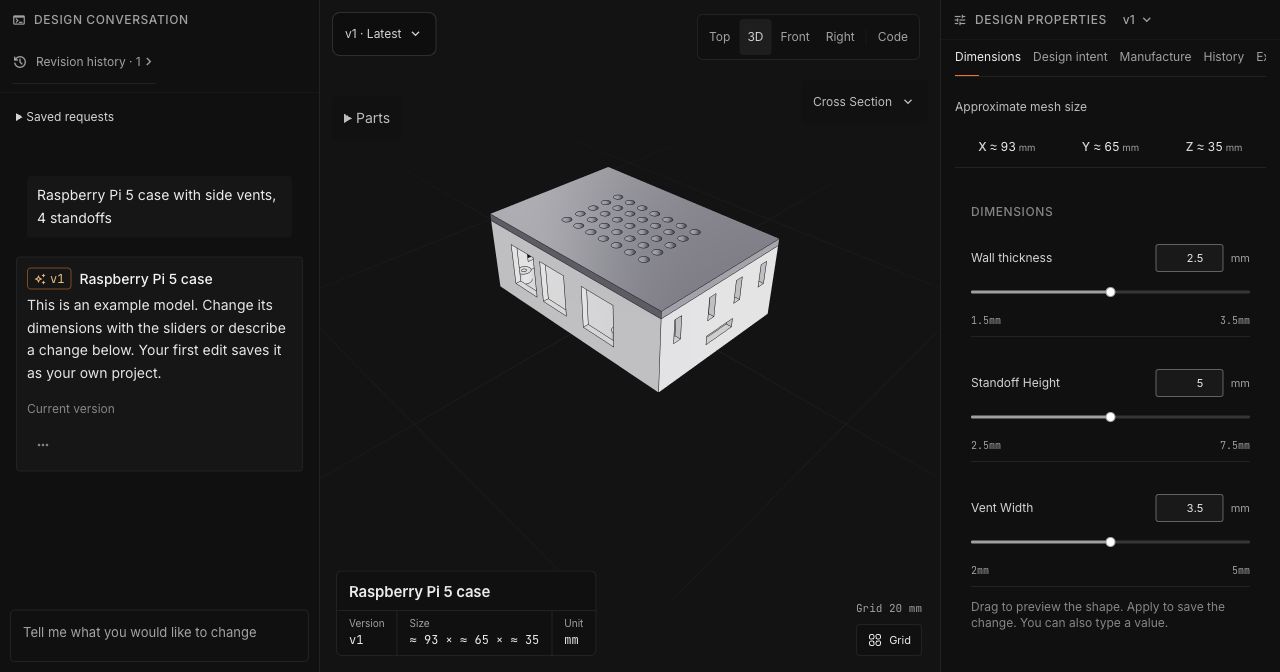
Figure 1. A maker-oriented starting point: the Raspberry Pi case example places the request, model and controls for wall thickness, standoff height and vent width in one workspace. This saved example is separate from the ribbed enclosure discussed below.
The core value: approachable engineering CAD that can keep evolving
CADlingo's user-friendly proposition has two parts: an accessible way to express a design, and CAD geometry that can continue into engineering work. A short idea and a detailed specification are both useful inputs. Conversation lets the user develop requirements and ask for changes; supported dimension controls offer a direct way to adjust numeric values.
The distinction from mesh-first tools such as Meshy and Tripo is the modeling foundation. CADlingo uses AI to write and execute Python CAD programs with build123d, constructing geometry through operations such as extrusions, cuts, lofts and sweeps. Dimensions can drive that construction. Mesh assets can also be edited and printed, but a CAD program provides a different basis for working with dimensions, solid features and design relationships.
For a custom case, bracket or fixture, that means the discussion can stay focused on the part's purpose: what it must fit around, where an opening belongs, which dimensions should change and which should stay fixed. The agent implements the modeling work, while the user examines the result and directs the next step. STEP export provides a route into professional CAD software for further geometry edits; supported parameters remain available within CADlingo.
This is the strongest positioning for CADlingo: reduce the effort of turning design intent into an engineering CAD model that the user can understand and continue developing. Other AI CAD products, including Zoo and Adam, also address this field. The choice among them depends on how well each handles the user's brief, subsequent changes and file handoff. CADlingo's value is in making those tasks accessible in one workspace, with inspection, conversation, dimension controls and saved designs close to the model.
Control dimensions that the design exposes
A parametric model expresses geometry through values and relationships. CADlingo provides direct controls for supported parameters and accepts conversational requests for further changes. The controls vary by model, so users need to distinguish an available numeric adjustment from a feature change they must describe.
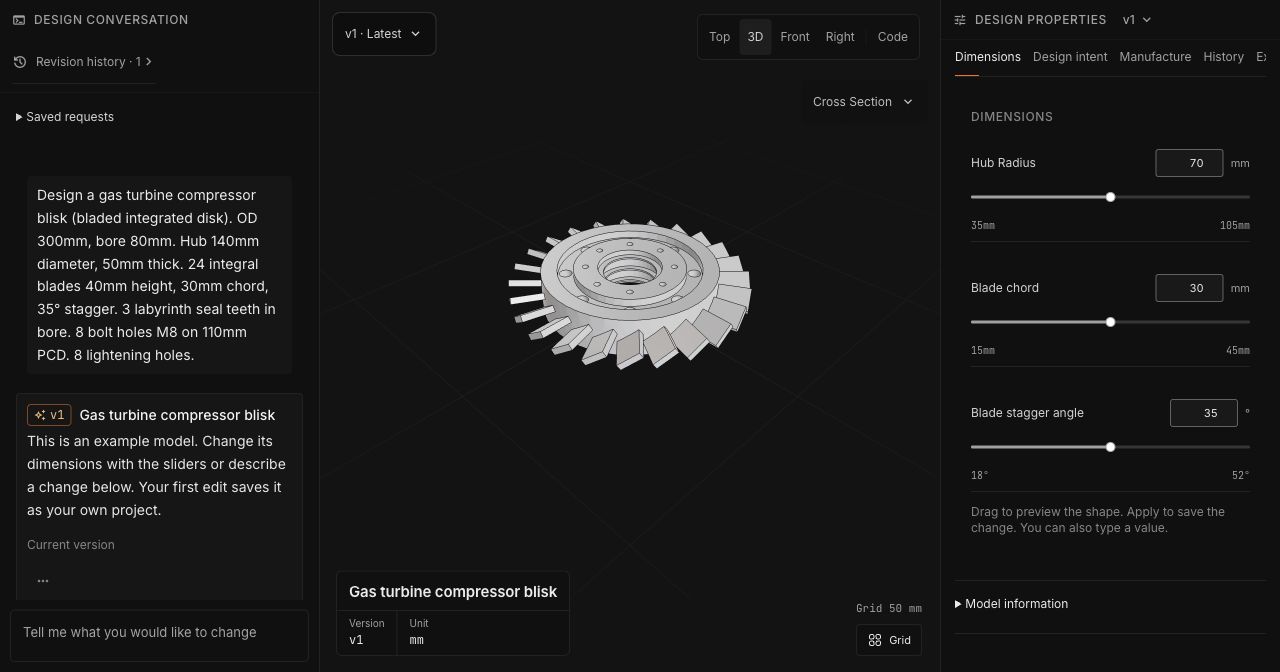
Figure 2. The blisk example shows a complex shape alongside its available dimensions. Read the controls as the editable surface of this particular design; the image does not show a completed dimension change or aerodynamic testing.
The ribbed electronics enclosure guide explains an important relationship: with the outer envelope fixed, increasing wall thickness reduces the cavity. A parameter's effect on nearby geometry is part of the inspection task.
Inspect components and internal structure
Models with several components create questions about arrangement and interfaces. The rocker-arm valve train example contains seven parts. Selecting components helps a user distinguish them within the overall model; the export menu also separates whole-model and available part files.
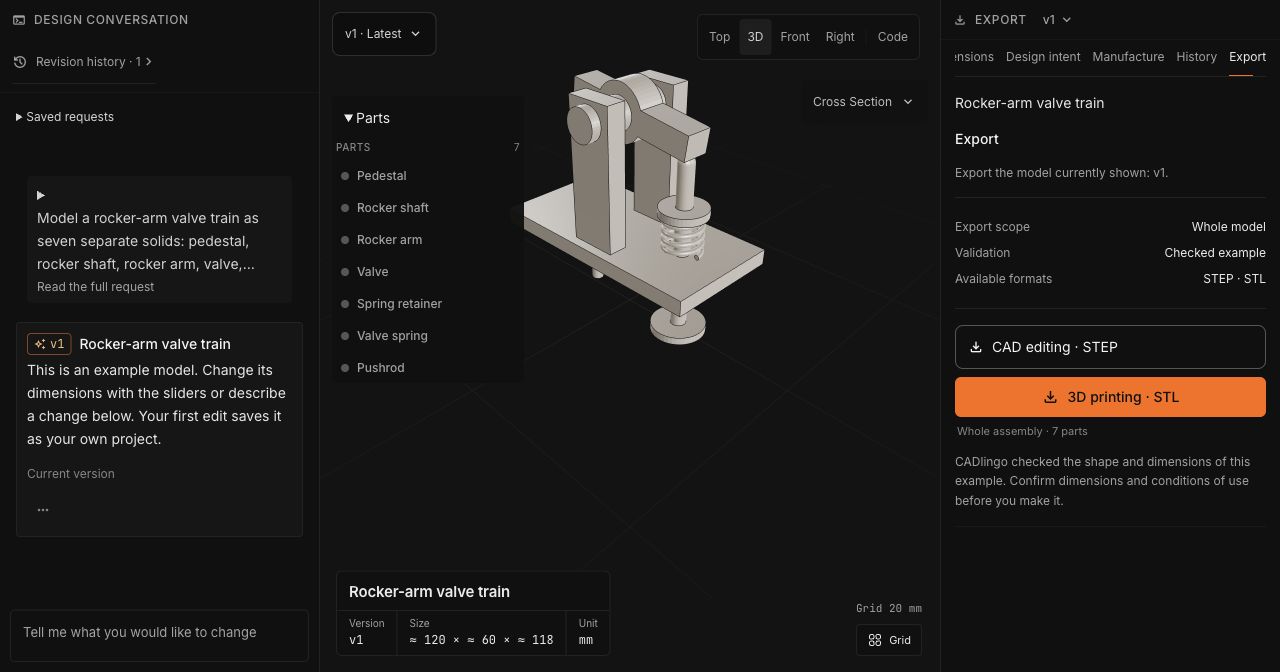
Figure 3. The part list makes the model's composition visible, while the right panel shows whole-model STEP and STL options. This is a geometric example, not a motion simulation or a record of a successful external-file handoff.
An internal passage or cavity needs another view. Cross sections let users examine features that the outside surface hides and decide what to check next.
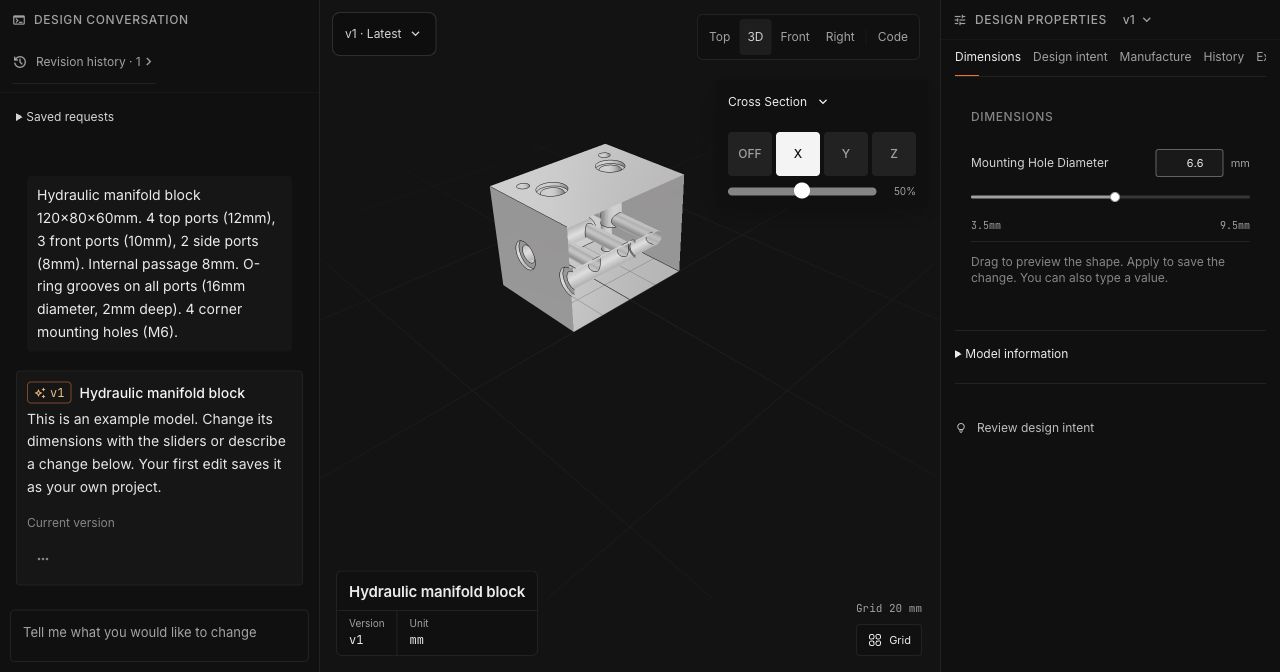
Figure 4. The manifold's X-axis section reveals internal passages that an exterior view would conceal. This supports visual inspection of the geometry; pressure, flow and manufacturing suitability require separate evaluation.
Make the next change specific
A useful revision names both the change and what should remain fixed. An illustrative mounting-hole request might be:
Move the two mounting holes 5 mm farther apart. Keep their diameter and the outside dimensions unchanged.
This request is an example, not an observed edit result. After a revision, inspect the changed feature and nearby geometry. Selecting a component for inspection does not automatically restrict a later AI edit to it, so the request should name the intended scope. Saved projects and earlier versions provide references for continuing work.
Carry the result into the next tool
File handoff is where the next stage begins. Whole-model STL supports slicing; STEP with an eligible paid plan carries CAD geometry into another application. STEP does not recreate every receiving application's native sketches and feature history.
Selected-part export is useful when a user needs one component separately. In the Raspberry Pi case example, the lid can be selected independently from the base.
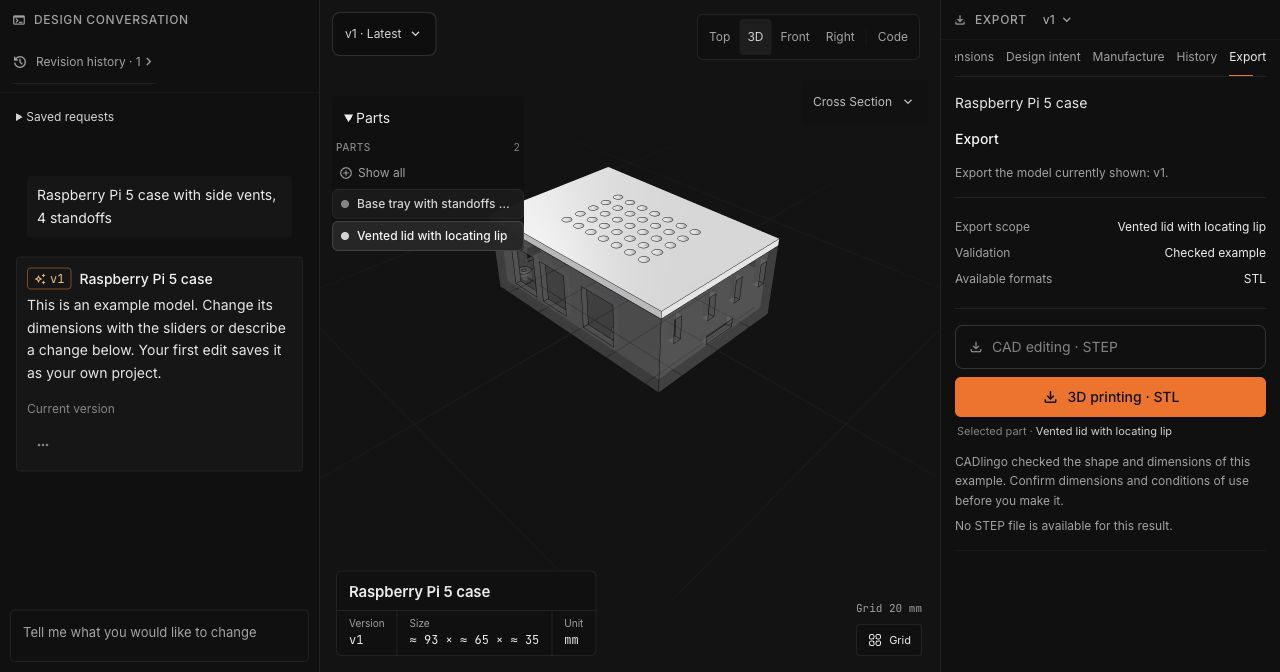
Figure 5. The highlighted lid matches the export scope in the right panel. STL is available for this selected part; STEP is disabled in this view. Availability is specific to the selected result.
CADlingo remains in beta. A useful evaluation ends in the intended CAD tool or slicer: check units, dimensions, clearances and the file's geometry, then assess the material and manufacturing requirements. Saved examples show possible modeling tasks and available controls, rather than a general success rate or customer outcome. Current plan and format conditions are on the pricing page.
Judge it on a part you need
A practical trial begins with a bracket, case or fixture whose requirements you can state. Inspect the first model, make one specific change and open the available export in your next tool. Record both the useful result and the checking or correction needed to reach it.
CADlingo offers a practical way to begin engineering CAD from the information a user already has. A detailed brief can guide the modeling implementation; a rough idea can develop through an exchange with the agent. Parametric construction, inspection tools and available CAD exports let the result keep evolving as the requirements become clearer. The useful outcome is a part the user understands and can continue refining toward their intended use.
Open CADlingo Studio, or examine the saved examples before starting your own brief.
Companies Mentioned

Stay Updated
Get the latest additive manufacturing (AM) market insights, company updates, and analysis directly in your inbox.
By subscribing, you agree to receive AMPulse emails and to our Privacy Policy. Unsubscribe any time.